
Laboratory QC with Westgard and Levey–Jennings — hold patients when controls fail
For lab techs, supervisors, and QA: native Westgard multirules, multi-level Levey–Jennings, CAPA review, and optional holds on upcoming patient results — inside middleware, not a spreadsheet.
- quality control
- Westgard
- Levey-Jennings
- laboratory QC software
- lab middleware
- ISO 15189
- clinical laboratory
- laboratory supervisor
- CAPA
The pain on the bench
Most labs do not lack QC. They lack QC that acts in time.
- Charts live on the analyzer, in Excel, or in a binder — reviewed when someone remembers.
- A Westgard fail is clear on paper; patient results may still keep moving.
- Night shift asks: “Is this run Accept or Reject — and who owns the comment?”
- At inspection, QA rebuilds the story by hand: failure → action → who cleared it → when patients resumed.
TransLABtor QC Workspace puts Westgard, multi-level Levey–Jennings, run review with CAPA, and optional holds on upcoming patient results on the same path as orders and results — inside laboratory middleware.
Book a QC Workspace demo · Policy framing: QC that doesn’t live in a spreadsheet
Who benefits
| Role | Pain today | What changes |
|---|---|---|
| Bench technologist | Hunting LJ charts; unclear Accept/Reject; levels not lined up | One workspace: stacked LJ, Point Data, Accept/Reject, comments |
| Lab in-charge / supervisor | Failed QC while patients still flow; weak shift handoff | Review worklist; severity tags; optional upcoming assay hold on Error |
| QA / quality officer | Inspection trail assembled from binders and emails | Fail → corrective action → hold/clear → resume, with audit |
| Lab IT (supporting cast) | Another siloed QC app to host and reconcile | Same middleware host as interfaces; license-gated module |
What you get day to day
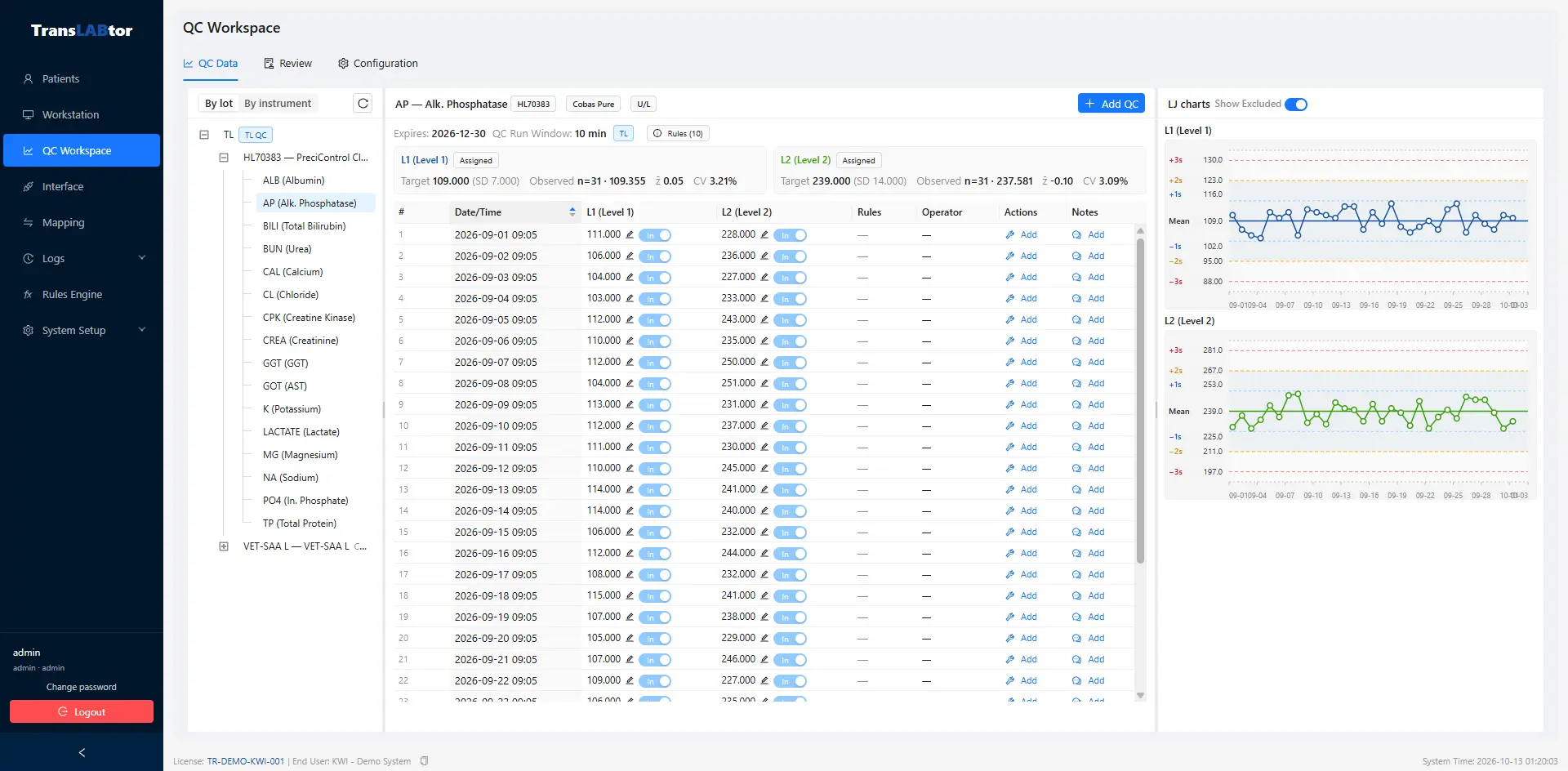
One place for multi-level Levey–Jennings
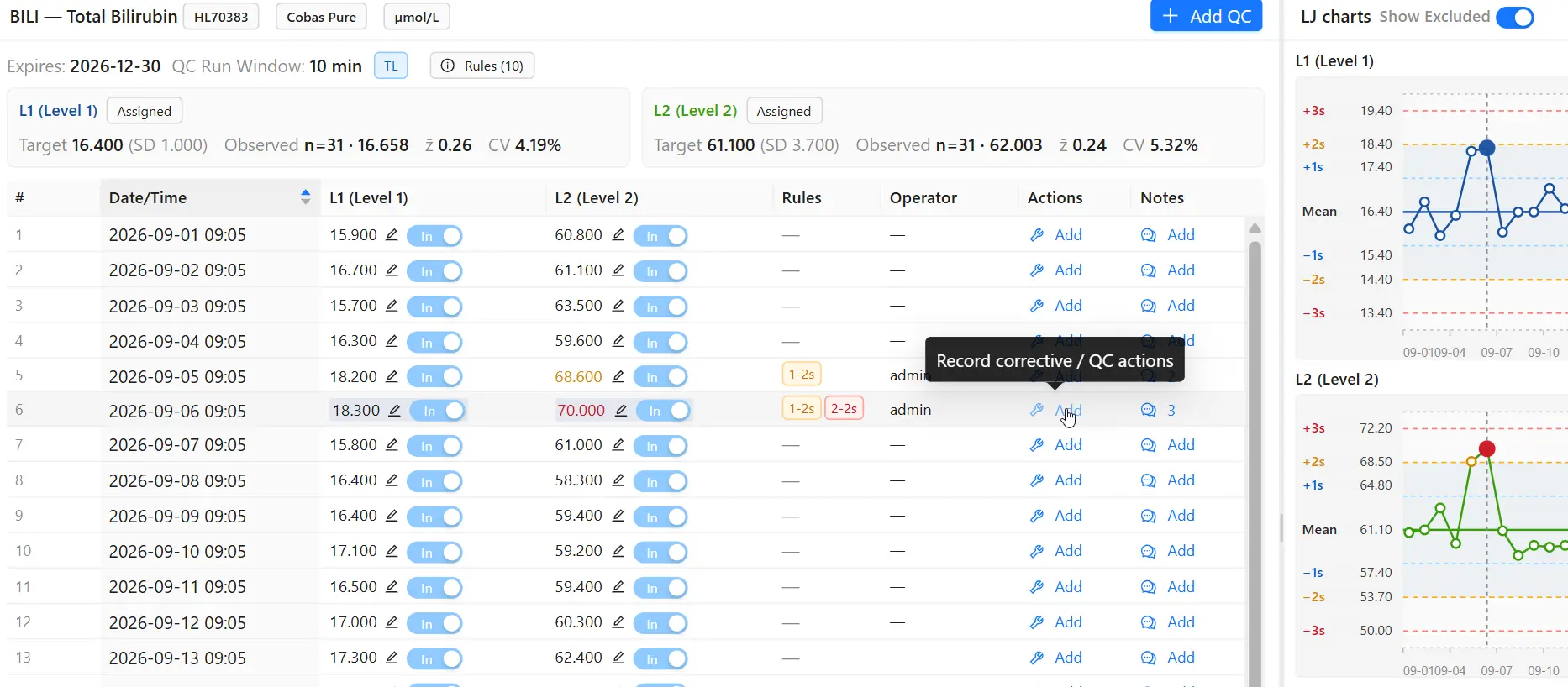
Stacked LJ charts share a run axis so L1 / L2 / L3 line up. Point Data shows include/exclude, rules, z-scores, run status, and comments. Clinical labels (Low / Normal / High) help the bench without changing the math.
Westgard that understands a multi-level run
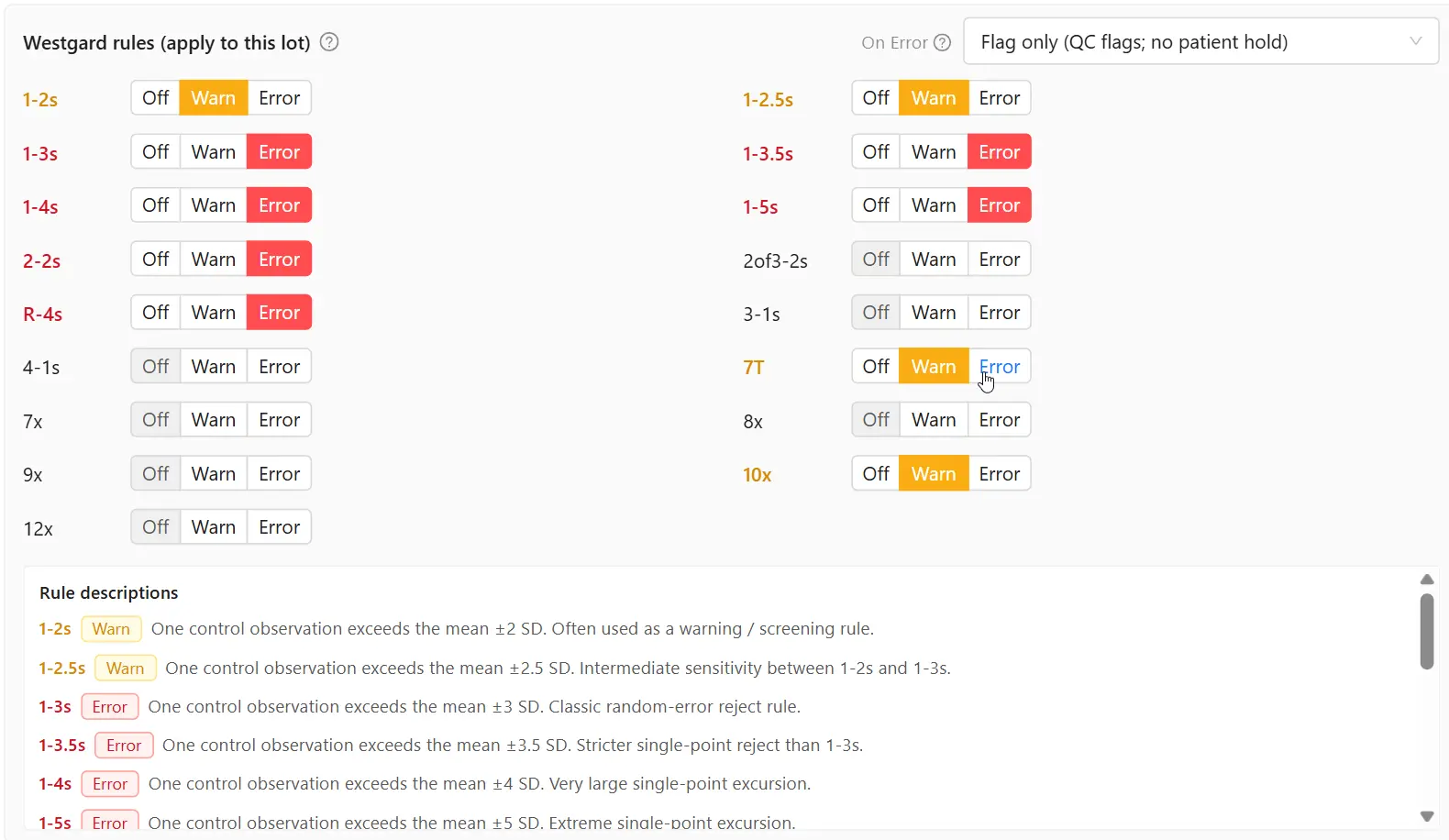
A configurable QC Run Window groups levels into one run. Within-run rules such as R-4s and 2of3-2s look across levels — not only consecutive points on one chart.
Rules support Off / Warning / Error severity (for example 1-2s, 1-3s, 2-2s, R-4s, 2of3-2s, trend / same-side). You choose what is noise, what needs attention, and what stops the path forward.
Review, CAPA, and schedule visibility
Supervisors get a Review worklist (unreviewed / warning / error). Banners flag patient testing without included QC or a missed configured schedule — visibility for ISO 15189–style frequency awareness.
Error runs can require a catalog corrective action (recalibrate, new reagent, rerun QC, maintenance, and similar) before Accept or Reject — so close-out is documented, not implied.
Hold upcoming patients
When lot policy On Error is set to hold, TransLABtor activates an assay lock so new patient results for that test (or all tests on the instrument) are stamped held. Operators clear the lock from TransLABtor’s result workspace; already-held rows still need manual release after QC is acceptable.
That distinction matters for patient safety and for inspection narratives.
Talk to us about QC hold policy
FAQ
In short, how does TransLABtor QC benefit my laboratory?
You stop splitting QC across analyzer screens, spreadsheets, and memory. Techs see L1/L2/L3 on one Levey–Jennings view and close a run with Accept/Reject and a real comment. When Westgard fires Error, supervisors know before the next patient batch keeps flowing — and if you turn hold on, new results for that assay wait until the lock is cleared. QA walks inspection with a trail: fail → corrective action → hold/clear → resume, instead of rebuilding it from binders and chat.
Do I need another QC system beside my middleware?
No. QC Workspace sits inside TransLABtor — the same place instruments and the LIS already talk. You are not buying a second charting island to reconcile every morning.
Will this rewrite my QC SOP?
No. Your SOP still owns materials, frequency, and what “acceptable” means. In the product you decide which Westgard rules are Off, Warning, or Error, and whether Error holds upcoming patients. The software runs the rules you chose; it does not invent your program.
If QC fails, can we stop patient results from going out?
Yes — for upcoming results on the failed test (or all tests on that instrument), when you set On Error to hold. Clear the lock from TransLABtor’s result workspace when the run is acceptable again, then release any held rows per your SOP. What already resulted stays under your normal release process.
We run two or three levels together — does Westgard see that as one run?
Yes. Levels that land inside the QC Run Window share one run, so within-run rules (R-4s, 2of3-2s, within-run 2-2s) look across levels the way you already think about a multi-level check on the bench.
Is this only useful for labs under one country’s rules?
No. If your lab already lives on Westgard multirules, Levey–Jennings review, and ISO 15189- or CAP-style evidence, the same workflow applies. Accreditation still defines the program; the module makes the day-to-day enforcement and the paper trail easier to defend.
Related reading
- QC that doesn’t live in a spreadsheet
- Encode QC gates and autoverification
- Autoverification without the anxiety
- Audit-ready trails for CAP and ISO 15189
- What lab middleware actually does
About TransLABtor
TransLABtor is on-premise laboratory middleware for instrument–LIS connectivity, rules, clinical workstation workflows, and optional native QC Workspace (Westgard, Levey–Jennings, review, and upcoming assay holds). Site QC program design remains with the laboratory.
Book a QC Workspace demo · See supported interfaces · Compliance overview